
Invisible Text Copy & Paste – Blank Space Unicode Characters
Sometimes you need extra spaces in text or want to create hidden messages, which is not possible with a normal keyboard. Many users get confused about how to copy blank text or invisible characters and use them correctly.
Invisible text tools and generators provide a simple solution to this problem. You can easily copy blank text and use it in blank space Instagram highlights in bios, adjust layouts, Discord usernames, or add creative spacing in WhatsApp and Facebook messages or comments with confidence.
Invisible Text: Very Small and Big Blank Copy Paste
The easiest way to get a very small big blank copy paste is with a dedicated generator.
Blank / Invisible Text Generator
[ ]Note: Preview markers are not copied. Zero-width characters remain invisible.
Blank Text Generator — Build Custom Strings
Works for Instagram, TikTok, Discord, WhatsApp, Facebook, Snapchat etc.
See the result in the real time
Zero-Width Invisible Characters
Zero-width space
U+200B • invisible
Zero-width Non-Joiner
U+200C • invisible
Zero-width Joiner
U+200D • invisible
Zero-width no-break
U+FEFF • invisible
Braille Blank
U+2800 • Braille Blank (visible width)
Visible Common Whitespaces
Narrow • THIN SPACE
U+2009
Ultra-narrow • HAIR SPACE
U+200A
Regular • SPACE
U+0020 (regular space)
Non-breaking • NBSP
U+00A0
Wide • EN SPACE
U+2002
Extra-wide • EM SPACE
U+2003
Ultra-wide • IDEOGRAPHIC
U+3000
What Is Invisible Text?
Invisible text is made up of Unicode characters that do not appear on the screen, but are still recognized as real text. These invisible characters cannot be seen by the human eye but serve important functions. When typed or pasted, they appear blank. They are created using special Unicode characters like Zero-Width Space (ZWSP), Zero-Width Joiner (ZWJ) and Zero-Width Non-Joiner (ZWNJ).
Invisible text can be used to write secret messages or add blank spaces that are only visible in the preview, not on the screen.
Invisible Text Generator: Core And Advanced Features
Our Invisible Text Tool helps you create blank spaces and copy them with one click and use anywhere. You can add spaces in designs, Style your username or send a unique invisible message to friends. This tool delivers exceptional results, and some advanced features are mentioned below:
One-Click Blank Text Copy
Instantly copy blank text with one click, making it very easy to use. You don’t need any manual selection - just copy the invisible characters and paste them anywhere to add creativity.The single click feature ensures the text is copied accurately with no errors and hassle, saving time and effort.
Best for:Instagram, WhatsApp, and Facebook comments, Youtube channel name or anywhere you want to send unique invisible text.
Zero-Width Invisible Text
Using zero-width invisible characters allows you to add hidden text without creating visible spaces in messages, comments, or posts. These characters have no visible width on the screen. They remain completely hidden when typed or pasted, but systems and applications still recognize them as text.
Best for:Gaming usernames(PUBG, Freefire, Fortnite or Roblox), social media bios, and controlling layout without visible spacing.
Whitespace Character & Typography Testing
Whitespace characters are used in typography to help designers adjust layouts more precisely. Sometimes the normal keyboard space does not work properly, so you can use special Unicode spaces like EM, EN, Thin, or Narrow spaces. Choose the one that best fits your needs, copy it, and test it in the preview before applying it. This allows you to see the result instantly and make adjustments if needed.
Best for:Banners, product names, and layout adjustments.
Empty Character Generator – Copy & Paste
With this tool , you can generate empty characters with one click fast and securely. Build custom length any(1 to 100) with any unicode characters. Copy the character and paste it in the preview box and see the result then paste anywhere you need. Do not write manually; it's a time waste, open this tool, select the character and length then copy it.
First test in the preview box with any error you see in front of us to fix this and then adding in the tiktok usernames , bios and adding in designs to increase creativity.With this tool, you can generate empty characters quickly and securely with just one click. You can build a custom length (from 1 to 100) using different Unicode characters based on your needs. Simply select the character type and desired length, then copy the generated string instantly.
Before using it anywhere, you can paste it into the preview box to check how it appears. If there is any issue, you can adjust it easily. There’s no need to type characters manually — this saves time and avoids mistakes.
It is especially useful for invisible name tiktok, twitter posts, social media bios and creative designs. Invisible text also used in iphones.
How to Copy and Paste Invisible Text
Copying invisible text is very easy with the right tool. Invisible characters cannot be typed manually on a keyboard, so generators and copy tools are used. Most tools provide a preview box to see the result in real time before posting. This tool also includes a preview box so you can check the invisible text before applying it anywhere.
Copy, Preview, and Practical Uses of Invisible Text
- Copy any Unicode character with a single click
- Preview before posting to ensure correct spacing and no errors
- Use for captions, hidden messages, design creativity, or social media usernames and bios
How to Type Invisible Characters On Keyboard ?
- These characters cannot be typed directly on a normal keyboard
- Use Unicode input methods or invisible text generator tools to copy them
- Paste the copied invisible text wherever you need it
Invisible Characters - Practical Use Cases
Invisible characters are widely used on social media to create empty posts, style usernames, or format bios. Users can add unique spacing without showing any visible characters, helping profiles stand out. Gamers also use invisible text to design clean and creative usernames, maintaining layout and adding a unique touch.
These characters can also be used to send secret messages, control text alignment, and add spaces in banners or titles.
Style social media bios & usernames
Create blank caption or unique gaming names
Align captions, banners, or posts
Send hidden messages or secret spaces
Benefits of Using Invisible Text Generator
Finding invisible characters manually can be difficult, but a generator makes the process simple. Users can create hidden text instantly without needing any technical knowledge.
When copying Unicode characters manually, there is a risk of selecting the wrong one. This tool provides the correct characters along with a preview option to confirm clean layout and proper formatting. It also allows users to control spacing, whether they need a shorter gap or a longer invisible sequence.
Different apps treat invisible characters differently. Generator tools provide tested characters that work more reliably across multiple platforms.
Understanding Empty Characters
Empty characters are special Unicode characters that appear blank on screen but are technically part of the text. They differ from a normal keyboard space: some have visible width, like a Non-Breaking Space (NBSP), while others have zero width, like a Zero-Width Space (ZWSP). It is important to understand the situation in order to use the correct character in the right place.
If another symbol appears instead of a blank space, like a small box or dot, it means the device or font does not properly support that character. Each empty character serves a different purpose. Some prevent layout breaks (like NBSP), while others are used for hidden formatting (like ZWSP). Using the wrong character can lead to spacing issues or text trimming problems, so understanding these differences is essential.
Non-Breaking Blank Spaces: Using NBSP
A Non-Breaking Space (NBSP) is a special Unicode character that behaves like a normal space but prevents text from breaking into a new line. Unlike a regular keyboard space, NBSP ensures that numbers, words, or elements stay together on the same line to maintain the layout.
NBSP is commonly used in web design, social media banners, and product names. It helps control spacing when formatting is important, ensuring that text appears exactly as intended without unexpected line breaks.
You can copy NBSP from an online source or use a generator tool to insert it easily. It is recommended to preview the text in real time to confirm the correct width and spacing before applying it.
Unicode Whitespace Characters for Writing
Unicode whitespace characters are special spacing characters that provide more control than a normal keyboard space. They are widely used in writing and typography to improve text layout and readability. Each whitespace character has a different width and behavior. Add elegance to titles and invisible letters.
Some common whitespace characters include:
- Normal Space (keyboard space)
- Non-Breaking Space (NBSP)
- Em Space
- En Space
- Thin Space
- Zero-Width Space
Some of these provide visible spacing, such as Em, En, or Thin Space, while others are used for invisible formatting, such as Zero-Width Space. These characters help create structured writing and visually balanced text.
Unicode whitespace characters play an important role in professional writing, web content, and digital publishing. Using the right whitespace keeps text clean, readable, and properly aligned. Using the wrong whitespace can lead to line breaks or uneven spacing issues.
Top Blank Unicode Characters You Can Copy
Unicode characters are commonly used for formatting, spacing, and invisible text control. Some create visible gaps, while others remain completely hidden but still function within the text structure.
Space Unicode Reference Table
| Character | Name | Unicode | Visible? | Best Use |
|---|---|---|---|---|
| Space | Regular | U+0020 | Yes | Normal typing |
| NBSP | Non-breaking | U+00A0 | Yes | Prevent line break |
| Em Space | Extra-wide | U+2003 | Yes (Wide) | Large spacing |
| Thin Space | Narrow | U+2009 | Yes (Small) | Subtle spacing |
| ZWSP | Zero-width space | U+200B | No | Hidden formatting |
| ZWNJ | Zero-width Non-Joiner | U+200C | No | Break character joining |
| ZWJ | Zero-width Joiner | U+200D | No | Join characters |
| (2800) | Braille Pattern Blank | U+2800 | Blank glyph | Rare, font-dependent |
How Unicode Blank Characters Function – A Deep Dive
Unicode blank characters work within a universal encoding system where every character is assigned a unique code point. Even if a character appears invisible on screen, it still exists as data within the text. Systems, browsers, and apps recognize these characters because they are part of the text string, not simply empty space.
Some blank characters have visible width, meaning they create measurable spacing between words. Others, such as zero-width characters, take up no visual space and are not shown on the screen. This is why the same invisible character may behave slightly differently across platforms.
Certain systems automatically remove extra spaces created by a normal keyboard space. However, some Unicode blank characters are treated as valid text and are not removed. This is why invisible characters can remain hidden while still affecting formatting, alignment, or line breaks.
- Zero-width characters (ZWSP, ZWJ, ZWNJ): These have no visible width but can affect character joining, text flow, or emoji rendering.
- Whitespace characters (EN SPACE, EM SPACE, NBSP): These create visible gaps with specific widths and may include non-breaking behavior.
- Special blanks (Hangul Filler U+3164, Braille Blank U+2800): These appear visually blank box but are treated as actual characters by many systems.
The Invisible Font Misconception: It’s Actually Characters
Many people think that invisible text is created using an “invisible font” or “empty space font”. However, there is no such font that automatically makes text invisible. In reality, invisible text is created using special Unicode characters, not a font or an empty space style.
A font only changes the appearance of text, such as making it bold, italic, or styled differently. Invisible characters, on the other hand, work through their Unicode identity. These characters appear blank on the screen, but the system still recognizes them as actual text.
The confusion usually happens when users see a blank username or hidden message. They assume a special font was used. In reality, what works behind the scenes are zero-width or special blank Unicode characters, such as ZWSP or NBSP.
Explaining the “Invisible Symbol” (U+2800 Braille Blank)
U+2800, known as the Braille Blank, is a Unicode character that belongs to the Braille Patterns block. It appears visually blank, but it is still a valid character in the Unicode system. Its original purpose was to represent spacing within the Braille writing system.
In most fonts, U+2800 looks completely blank, which is why many people call it an “invisible symbol.” However, it is not a zero-width character - it has its own width. The system treats it as normal text, so it can be copied, pasted, and stored like any other character.
This character is sometimes used for blank usernames or hidden spacing. However, some platforms may restrict it because it is technically a visible-width character. Before using it, it is recommended to preview the result and review platform rules.
The Unicode character code U+280F (Unicode 280F) is a unique Unicode code used in the Braille Patterns block.
Tip: NBSP is better for controlled visible spacing. ZWSP is better for invisible spacing without visible gaps.
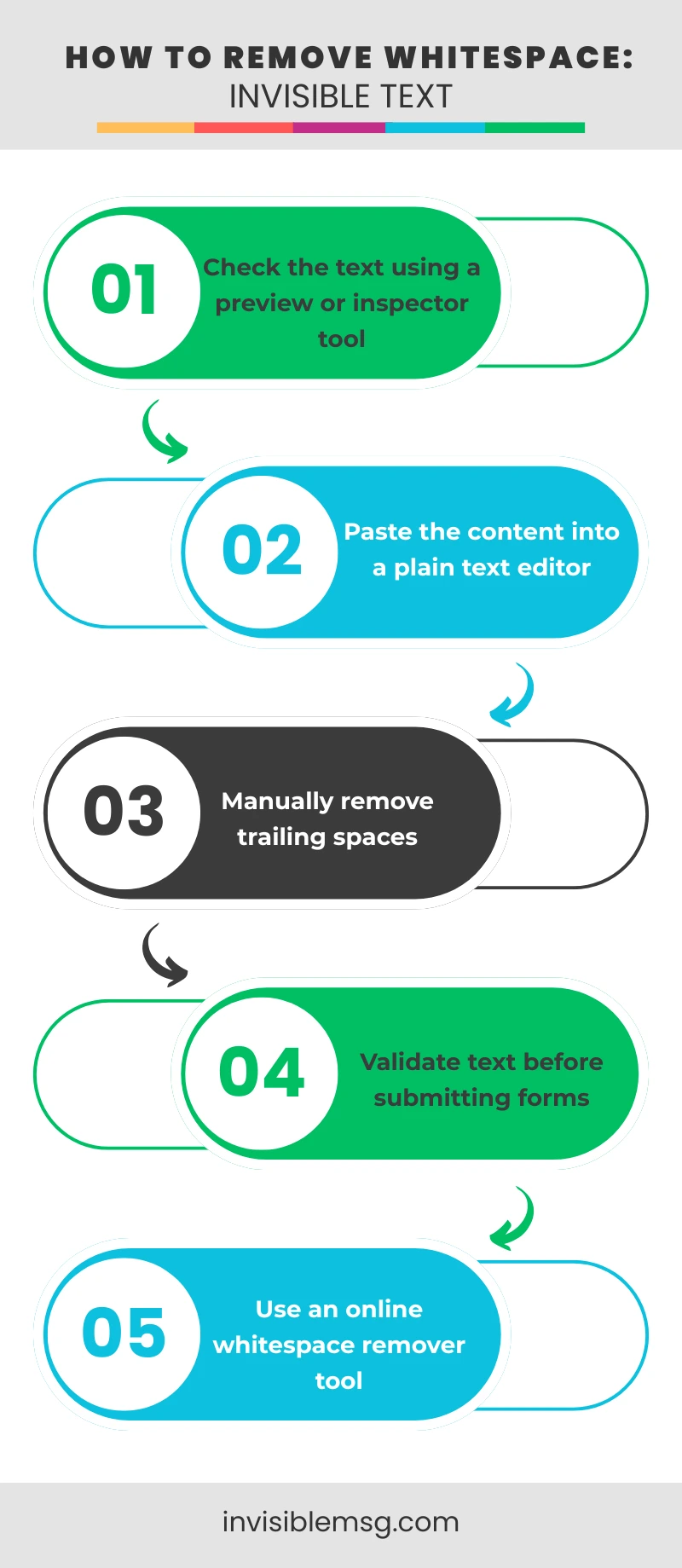
How to Remove Trailing Whitespace & Hidden Characters
Trailing whitespace or hidden characters are created when extra spaces or invisible Unicode characters are added at the end of a text. These are often added accidentally during copy-paste actions or when using formatting tools. Most users are unaware of them because they are not visible on the screen.
Hidden characters can sometimes cause username errors, form validation issues, alignment problems, or unexpected line breaks. In programming, web development, and content editing, they can create serious issues because systems treat them as real text.
Safe Use and Accessibility Guidelines for Invisible Text
Invisible text tools should always be used responsibly. Their purpose is formatting, spacing, or creative styling. However, misuse can create confusion or lead to platform policy issues. Every platform has its own rules, so it is important to review them before using invisible characters.
- Do not hide important information using invisible text.
- Avoid excessive use of invisible characters
- Always preview and test before publishing
- Follow platform rules and community guidelines
- Maintain clean and readable formatting
Frequently Asked Question
Some users get confused while using invisible text or blank text. This section answers common questions such as what invisible characters are, how to use them in usernames, and how to fix copy-paste issues.
How to Create a Fully Blank Username?
▼
You can create fully blank usernames using zero-width characters, which do not produce any visible space. Tools or generators help select the correct characters, ensuring the username is valid and follows platform rules.
Why Invisible Text Sometimes Disappears?
▼
Platforms automatically remove trailing whitespace or zero-width characters, Unsupported fonts or apps ignore invisible characters, Copy-paste actions can trim the characters, Always use the preview box to test before applying.
Safest Invisible Characters for Captions
▼
For captions, the safest invisible characters are ZWSP (Zero-Width Space) and NBSP (Non-Breaking Space). These characters help control spacing and maintain high compatibility across platforms.
How to Check if Invisible Text Was Copied?
▼
Paste it into a preview box to see the result, Use a text inspector or Unicode viewer tool, Paste into a plain text editor to detect unwanted or extra characters.