
Discord Invisible Name vs Blank Name — Are They Actually the Same Thing?
You search for "Discord invisible name" and find one guide. Someone else searches "Discord blank name" and lands on a different one. Are they looking for the same thing?
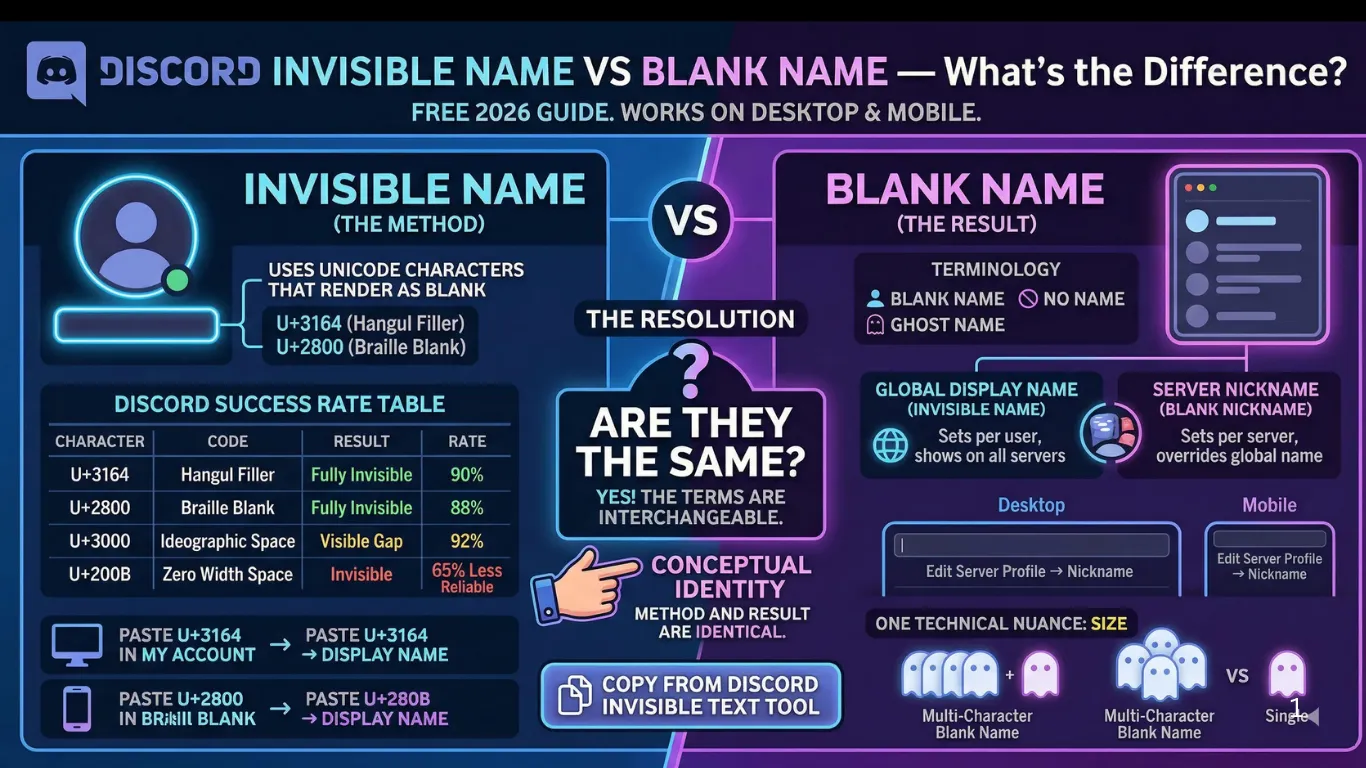
Almost entirely yes — but there are two specific situations where the difference actually matters. This guide covers both, plus the exact setup steps for every platform.
Quick Answer
Discord invisible name and blank name are the same result achieved the same way — Unicode invisible characters in your display name field. The word someone uses depends on whether they're describing the method (invisible characters) or the outcome (blank-looking name). Both use U+3164 or U+2800. Both look identical.
Table of Contents
- The Actual Difference Between the Two Terms
- One Real Practical Difference — Character Count
- Which Character to Use on Discord in 2026
- Global Display Name vs Server Nickname
- Setup Steps — Desktop, Mobile, and Web
- 3 Situations Where People Get Confused
- Will Discord Ban You for an Invisible Name?
- Same Method on Other Messaging Platforms
- All Terms — Quick Reference Table
- Frequently Asked Questions
The Actual Difference Between the Two Terms
Here's the full breakdown of how people use these terms — and what they actually mean technically:
Describes the method. The name is made of invisible Unicode characters — characters that exist in the code and pass validation, but have no visible glyph. People who understand the Unicode trick use this term.
Describes the visual result. When someone looks at the name and sees nothing, they call it blank. People who discovered the trick and want to copy it use this term — they don't necessarily know about Unicode.
A casual description of the same outcome. Often used in questions: 'how do I get no name on Discord?' All three phrases lead to the same method and the same result.
// What Discord actually stores:
True empty field → "" → rejected by Discord
Spaces only → " " → stripped, rejected
Invisible char → "ㅤ" → valid ✓ → renders as blank
One Real Practical Difference — Character Count
Conceptually identical, but there is one situation where you need to think about how many invisible characters to use:
Single character (1×)
Most commonOne U+3164 character. Works on the majority of Discord setups. This is what most guides mean when they say 'invisible name'.
Multi-character (2–3×)
Sometimes neededSome Discord server configurations or older client builds enforce a minimum character count. Two or three invisible characters still look blank but satisfy the minimum.
Wide-space variant
Not truly invisibleU+3000 (Ideographic Space) creates a slightly visible wide gap rather than true invisibility. Higher acceptance rate, but perceptible on some screens — technically 'blank-ish' rather than invisible.
Safe default: Start with one U+3164. If Discord rejects it, paste two copies. Both appear identical from the outside — completely blank.
Which Character to Use on Discord — 2026 Compatibility
Discord's name validation has evolved over time. Here's how each invisible character performs on current Discord builds:
| Character | Code | Visual Result | Discord Success Rate |
|---|---|---|---|
| Hangul FillerRecommended | U+3164 | Fully invisible | 90% |
| Braille Pattern Blank | U+2800 | Fully invisible | 88% |
| Ideographic Space | U+3000 | Visible wide gap | 92% |
| Zero Width Space | U+200B | Invisible | 65% |
Note on U+3000: Ideographic Space has the highest acceptance rate but isn't truly invisible — it creates a noticeable wide gap on some screens. Use it only if U+3164 and U+2800 both fail after a Discord update.
Global Display Name vs Server Nickname — The Real Distinction
This is the one area where "invisible name" and "blank name" can actually refer to different things — not because the characters differ, but because the placement differs.
Set in: User Settings → My Account → Display Name
Scope: Shows across ALL Discord servers by default
When servers call it: People say "invisible name" because it applies globally to your identity.
Override: A server nickname overrides this on that specific server.
Set in: Right-click name → Edit Server Profile → Nickname
Scope: Only on that specific server
When people call it: "Blank nickname" — because you see the blank result on a per-server basis.
Override: This overrides your global display name on that server only.
// Example setup:
Global display name → U+3164 (invisible on every server)
Server A nickname → "MyActualName" (overrides global on Server A)
Server B nickname → U+3164 (blank on Server B too)
You can mix these freely — visible on some servers, blank on others, using the same global account.
A Third Field Nobody Mentions: Custom Status
The Global Display Name vs Server Nickname comparison above covers the two fields most people mean by "invisible name," but Discord has a third, separate text field that can be made blank the same way: Custom Status — the short line of text that appears under your name in the member list and friends sidebar, set via your profile picture → Set Custom Status.
This field behaves independently from both the display name and server nickname. It's global like the display name (not per-server like a nickname), but it's optional in a way neither of the other two fields are — Discord allows a genuinely empty Custom Status by default, since clearing it just removes the status line entirely rather than requiring a placeholder character.
Where an invisible character becomes relevant here is a specific edge case: some emoji-only or minimal-status setups use U+3164 alongside a single emoji so the status shows just the emoji with no trailing text space — pasting the invisible character after the emoji keeps the field "filled" for apps that check status length, while visually showing only the emoji. This is a different use case from making a name disappear; it's closer to the invisible-spacer technique covered in some of the creative-uses guides on this site.
Can You Search For Someone With a Blank Name?
A question that comes up once someone actually sets an invisible name: can other people still find them? Discord's member search (the search icon inside a server's member list, or Ctrl/Cmd+K for the global quick switcher) matches against the account's username handle first, not the display name — so searching for someone's exact @handle finds them normally regardless of what their display name looks like.
Where it gets harder is searching by display name specifically, which some people do when they only remember how a name looked rather than the handle behind it. An invisible display name obviously can't be typed into a search box, so anyone trying to find that person by typing what they saw — nothing — has no useful search term to work with. The quick switcher's fuzzy matching also relies on visible characters, so it has nothing to match against for a purely invisible name.
In practice, this means a blank name makes you effectively unsearchable by name while remaining fully findable by handle — the same split covered in the mentions and search sections of other invisible-name guides on this site. If you want to stay reachable by name-based search while still keeping a mostly blank look, pairing one visible character with an invisible one (rather than going fully blank) keeps a minimal search anchor intact.
Setup Steps — Desktop, Mobile, and Web
The invisible character method works identically across all Discord platforms. Only the interface layout differs:
- 1Open Discord → click the ⚙ gear icon (bottom left)
- 2Go to My Account → click Edit next to your display name
- 3Clear your current display name completely
- 4Paste the invisible character — 1× U+3164
- 5Click Save Changes
- 1Open Discord → tap your profile icon (bottom right)
- 2Tap your display name at the top
- 3Tap Display Name to edit
- 4Clear the field completely
- 5Long-press → Paste the invisible character → Save
- 1Go to discord.com and log in
- 2Click ⚙ User Settings → My Account
- 3Click the pencil icon next to your display name
- 4Clear the name field and paste U+3164
- 5Click Save Changes
For blank server nickname (not global name): Right-click your username in any server's member list → Edit Server Profile → clear the Nickname field → paste U+3164 → Save. This only affects that server.
3 Situations Where People Get Confused
Your name is "invisible" — but others see a box symbol (□)
Why it happens: The character U+3164 renders as blank on your device but another user's device doesn't have the font glyph for that Unicode point, so they see a placeholder box instead.
Fix: Switch to U+2800 (Braille Pattern Blank). It has broader font support across older Android and iOS versions where U+3164 may not render.
Your "blank" name shows as the Korean character ㅤ on some platforms
Why it happens: You copied U+3164 from a source that added visible text encoding. The character that pasted is not the clean Hangul Filler — it's a formatted version that renders as visible on some systems.
Fix: Re-copy the character fresh from our Discord invisible text tool. The copy button ensures a clean, unformatted Unicode code point.
Name saves but Discord immediately reverts it
Why it happens: Discord's validation layer filtered the character you used. This happens most often with U+200B (Zero Width Space), which Discord has partially blocked.
Fix: Use U+3164 or U+2800 instead. These pass Discord's current name validation. If still rejected, try pasting two U+3164 characters — some Discord builds require a minimum character count.
Will Discord Ban You for an Invisible Name?
No bans have been reported for invisible display names alone. Discord's Community Guidelines restrict harmful, offensive, and deceptive content — not Unicode character choices.
✓ Safe to use
- →Blank global display name
- →Blank server nickname
- →Multiple invisible characters stacked
- →Using for aesthetic or privacy reasons
✗ Potential policy issue
- →Using a blank name to impersonate a specific user
- →Blank name + misleading avatar to deceive others
- →Evading a server ban via name changes
Server admins can always see your account's username handle (@yourhandle) and user ID regardless of your display name. An invisible display name affects visual presentation only — it doesn't hide your account from moderation tools.
Same Method on Other Messaging Platforms
The invisible vs blank name distinction applies the same way across other platforms. The characters are identical everywhere:
All Terms — Quick Reference Table
| Term People Use | What It Means | Method |
|---|---|---|
| Invisible Discord name | Display name that appears completely empty | U+3164 or U+2800 in global display name |
| Blank Discord name | Same — display name appears completely empty | U+3164 or U+2800 in global display name |
| No name Discord | Same — display name appears completely empty | U+3164 or U+2800 in global display name |
| Discord blank nickname | Server-specific blank name (overrides global) | U+3164 in per-server nickname field |
Frequently Asked Questions
Is Discord invisible name the same as blank name?
▼
Yes — both describe a display name that appears completely empty. Both use invisible Unicode characters. The difference is only in the word people choose: 'invisible' describes the method, 'blank' describes what you see.
Can I have a truly empty Discord name with no characters at all?
▼
No. Discord requires at least one character in the display name field. An invisible Unicode character like U+3164 satisfies this while looking completely blank to everyone viewing it.
What is the best invisible character for Discord in 2026?
▼
Hangul Filler (U+3164) is the most reliable in 2026, with around a 90% acceptance rate. Braille Pattern Blank (U+2800) is the best backup at 88%.
Does a blank Discord name show in DMs?
▼
Yes. Your display name is global to your account — it appears blank in DMs, servers, and anywhere else your name is shown.
Can Discord server admins see my invisible name characters?
▼
Admins can see your username handle (@yourhandle) and user ID regardless of your display name. They cannot see the specific Unicode characters in your display name unless they copy it and inspect it in a Unicode tool.
Can I have a blank server nickname on every server?
▼
Yes. Server nicknames are set individually per server via right-click → Edit Server Profile → Nickname. Set U+3164 in as many servers as you want — each is independent.
Does an invisible Discord name affect my roles or permissions?
▼
No. Roles and permissions are tied to your account ID, not your display name. An invisible name has zero effect on server access or what you can do.
Will Discord ban me for having an invisible name?
▼
No bans have been reported for invisible display names alone. Discord's policy restricts harmful content and impersonation — not Unicode character choices in display names.
What do I do if my invisible name shows as a box symbol to others?
▼
Switch from U+3164 to U+2800 (Braille Pattern Blank). The box symbol means the viewer's device font doesn't support U+3164's rendering — U+2800 has broader font compatibility.
How is a blank server nickname different from an invisible global name?
▼
Same character, different scope. A blank server nickname only affects how you appear on that specific server. An invisible global display name is your default across all servers that haven't given you a nickname.
Get Your Discord Invisible Character
Whether you call it invisible or blank — the setup takes under a minute. Copy the Hangul Filler from our Discord tool, paste it into your display name field, save. Done.
The same character works for WhatsApp blank messages and PUBG blank names too.
Not affiliated with or endorsed by Discord Inc. "Discord" is a trademark of Discord Inc. · Last updated: May 2026